

I’ll be honest. When I first saw these three new options on the Feature Management page in Business Central, they immediately caught my attention. Allow multiple users to post at the same time? Reduce blocking? Improve performance? YES, PLEASE!

But wait a minute. We are talking about posting.
We are talking about inventory, costing, projects, resources and, ultimately, the General Ledger. Maybe we should slow down and understand what this feature is changing before we enable it in a production environment. I am not suggesting this is a bad feature. It may be a fantastic feature, especially for a company with high transaction volume, warehouse activity, automated integrations or many users posting throughout the day. However, Microsoft is changing a posting behavior that has existed in Business Central for a very long time and I feel that deserves some attention.
What Is Actually Changing?
Traditionally, Business Central has protected certain ledger tables by temporarily locking them during posting. If one user is posting a sales shipment while another user is posting an Item Journal, one transaction may need to wait while the other transaction creates its ledger entries. That controlled process helps Business Central assign Entry Nos. in sequence. The downside is that two unrelated transactions may block one another, even when the transactions involve different documents, items or locations.
These new features change how Business Central assigns those Entry Nos. Multiple posting sessions can obtain Entry Nos. and perform more work at the same time. That is where the performance improvement comes from. However, entries created by two simultaneous transactions may no longer appear in perfectly consecutive groups.
For example:
Transaction A might create Entry Nos. 100, 102 and 104
Transaction B might create Entry Nos. 101, 103 and 105
Does that mean the transactions or accounting entries are mixed together? NO! It means the Entry Nos. were assigned while both transactions were being processed. Entries are numbered independently within each affected table. The same number sequence does not span Item Ledger Entry, Value Entry, Capacity Ledger Entry and other tables collectively.
Here is the key concept:
An Entry No. is an identifier. It is not a guarantee that every entry surrounding it belongs to the same business transaction.
That may sound like a small distinction, but it could be a very important one, and it pertains to this new feature specifically. This feature makes interleaved ledger entries an expected possibility. Entries belonging to separate posting transactions may no longer appear in consecutive Entry No. order. The following Microsoft Learn illustration shows how entries created by simultaneous transactions can become interleaved across the affected ledger tables.

Is This an Accounting Change?
Not directly.
These features do not intentionally change:
Posting groups
G/L account selection
Dimensions
Inventory costing methods
Item applications
Expected and actual costs
The requirement for balanced G/L transactions
Business Central is changing how posting transactions can run concurrently. It is not rewriting the accounting logic used by those transactions.
Am I worried that standard Business Central will suddenly create unbalanced G/L entries because this feature is enabled? Not really.
Am I concerned that an extension, integration or custom report may have been built around the assumption that ledger entries are always consecutive? ABSOLUTELY!
Consider a customization that posts a document and then uses the last Item Ledger Entry created to identify the result. That logic may have worked when only one process could create entries in the table at a time. What happens when another user or integration creates an entry at nearly the same time? The customization might find the wrong entry. A report may also assume that every entry between a starting Entry No. and an ending Entry No. belongs exclusively to one posting process. An integration may assume that the newest Value Entry must be the entry it just created. These are the assumptions we need to find and test.
I would also proactively check with every extension provider or developer this very direct question:
“Do your solutions rely on consecutive Entry Nos., the most recently created ledger entry, or the ledger table remaining locked throughout posting?”
A statement that the extension is “compatible with the latest version of Business Central” does not completely answer that question.
Focusing on Inventory First
Of these three concurrent posting enablement features, inventory is the one I would spend the most time testing. Inventory posting can involve:
Item Ledger Entries
Value Entries
Item Application Entries
Item Registers
Reservations
Lot and serial tracking
Warehouse activity
Production or assembly
G/L Entries
Extensions and integrations
There is a lot going on there, and I certainly don’t purport to know it all. Regardless, two users may be posting at the same time, but both transactions could still need the same inventory. For example, if two outgoing transactions need to apply against the same open Item Ledger Entry, Business Central must update that incoming entry’s remaining quantity one transaction at a time. Microsoft therefore notes that two or more users cannot post to the same inventoriable item at the same time because Business Central must apply transactions to one open Item Ledger Entry at a time. The feature can eliminate unnecessary waiting. It cannot eliminate every reason one posting process may need to wait for another. Nor would we want it to. Business Central still needs to protect inventory availability, item application and costing.
Review Item Journal Batches before testing. Microsoft requires a different number series for each Item Journal Batch when concurrent inventory posting is used.
What About the General Ledger?
General Ledger posting remains sequential. This becomes particularly important when Automatic Cost Posting is enabled on the Inventory Setup page. Microsoft also specifically confirms that with Automatic Cost Posting enabled, simultaneous Item Journal postings can still wait for one another when their associated G/L posting occurs.
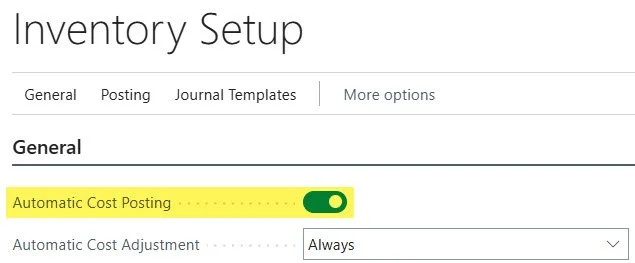
Two inventory transactions might begin posting concurrently, but one could still wait when the posting reaches the General Ledger. Does that mean the feature did not work? No. It may simply mean that part of the bottleneck moved from inventory-ledger numbering to the sequential G/L posting portion of the transaction. A company posting large volumes of unrelated items across multiple locations may see a significant improvement. A company repeatedly posting the same item against the same inventory layer may see less. The environment’s setup and transaction mix will determine the actual benefit. We need to test and measure it rather than assume what the result will be.
Should We Enable All Three Features at Once?
I would not. The three features are separate for a reason. They affect different ledgers and different posting paths. I would approach them this way:
Establish a baseline with all three features disabled.
Enable and test inventory concurrency.
Enable and test resource concurrency (if applicable).
Enable and test project concurrency (if applicable).
Complete a final test with all applicable features enabled.
Testing one feature at a time gives us a much better chance of identifying the source of any unexpected behavior. Remember that one transaction can touch more than one ledger. A project transaction might also include an item or resource. One part of posting may allow greater concurrency while another part still requires waiting. That does not necessarily indicate a problem. It may simply limit the performance gain.
How Would I Test This?
Start with a recent production-copy sandbox that is isolated from production integrations and external endpoints.
The sandbox should include the same:
Extensions
Integrations
Costing methods
Posting setup
Locations
Number series
Warehouse configuration
Item tracking
Representative transaction data
Before enabling anything, establish a baseline by recording:
Posting duration
Documents posted per minute
Posting errors
Locks or timeouts
Cost adjustment duration
Inventory-to-G/L reconciliation results
Then enable only the inventory feature and repeat the same workload.
Do not have one person post one simple positive adjustment and call the test complete. The purpose of the feature is concurrent posting. We need multiple users, sessions or integrations posting at approximately the same time. Consider testing or measuring:
Different items at different locations
Different items at the same location
The same item at different locations
Two transactions consuming the same inventory layer
Purchase receipts and sales shipments
Transfer orders
Item Journals
Lot- and serial-tracked items
Production or assembly transactions
API or integration activity running alongside users
Some of those tests should show an improvement. Some may still result in one transaction waiting. Both results are valuable. The goal is not to prove that everything can post simultaneously. The goal is to confirm that throughput improves without compromising inventory, costing, extensions or accounting.
Do Not Stop at “Posting Was Successful”
After testing, review:
Item Ledger Entry quantities
Remaining quantities
Item applications
Value Entry costs
Expected and actual costs
Lot and serial information
Dimensions
Inventory valuation
Item Registers
G/L Registers
Inventory-related G/L accounts
After completing the same cost-adjustment and inventory-to-G/L processes, the quantities, costs, dimensions, applications and financial results should reach the same correct outcome.
Use Telemetry
This is a performance feature. Watching somebody select Post a few times is not a performance test. Depending on the signals available, use Azure Application Insights, KQL queries and, where necessary, custom telemetry to measure or derive:
Posting duration
Documents posted per minute
Long-running AL operations
Long-running SQL operations
Database locks and timeouts
Deadlocks or retries
Extension errors
API response times
Job Queue performance
Adjust Cost duration
Post Inventory Cost to G/L duration
Keep the comparison fair. Use the same sandbox, data, setup, extensions, workload and approximate number of posting sessions. Telemetry tells us whether performance improved. Reconciliation tells us whether the results remained correct. We need BOTH!
Why You Have to Turn It On - and How
In a lot of environments this isn't just magically on. You enable it in Feature Management, and the switches are labeled "Feature Update: Enable multiple users to post item ledger entries and value entries at the same time." Similar options are available for job ledger and resource ledger entries. Depending on the Business Central version and terminology in use, the application may refer to jobs as projects, while the Feature Management option still refers to job ledger entries.

The administrative step takes about a minute. The validation effort should take considerably longer:
Hit Alt + Q and search Feature Management
Find “Feature Update: Enable multiple users to post item ledger entries and value entries at the same time”
Set it to All Users.
Sign out and sign back in so it takes effect.
The Bottom Line
“Am I making a big deal out of nothing?” I do not think so.
“Are these features something to panic about?” I do not think so either.
The biggest risk is probably not that standard Business Central will suddenly produce an unbalanced General Ledger. The bigger risk is that a customization, integration or report has quietly depended on consecutive Entry Nos. or predictable posting order. That is what we need to test. My recommended approach is straightforward:
Create a current production-copy sandbox.
Establish a baseline.
Review the installed extensions.
Enable one feature at a time.
Run realistic concurrent posting tests.
Compare telemetry.
Reconcile inventory and the General Ledger.
Test all applicable features together.
Document the results.
Monitor production after activation.
Can We Turn It Back Off?
While the Feature Management page shows that the feature can still be disabled, and before the feature becomes mandatory, you can return the setting to None. After users sign out and sign back in, new posting sessions return to the prior behavior. This does not undo, renumber or reorganize entries already posted.

Microsoft currently plans to make the feature mandatory in version 31, expected with 2027 release wave 2 beginning in October 2027. As always, release timing can change, so confirm the Feature Management page and current Microsoft documentation when planning activation.
This is the very essence of what Feature Management and this series is all about! We should not enable something simply because Microsoft made it available. We should not avoid it simply because it changes long-standing behavior either. Understand the change. Test it realistically. Measure the improvement. Reconcile the results.
Then turn it, on knowing in advance that you have the expected change fully under control.
I’m grateful should this experience or these insights be helpful to you on your journey…until next post!